January 16, 2026
Designing for everyone
What is Inclusive Design?
Everyone is unique – this is the impetus of Inclusive Design. Inclusive Design is the practice of creating products that meet the unique physical, cognitive, and emotional needs of users. Inclusive design practices are all around us. They can be seen in architecture where a floor looks like an average floor to a seeing person, but in reality, that beautifully patterned floor was thoughtfully texturized to help a blind person navigate the halls using their cane. This is only one example, if you pay close enough attention you will notice careful considerations that are made for inclusivity.
User’s interactions with technology rely heavily on our senses, just like they do in the physical world. Many end users have varying degrees of sensory limitations where there is no one-size or one-approach fits all solution, so how do you design for this? This is where Inclusive Design concepts come into play. The best way to begin the design process is research. You must learn about your users in order to understand their needs, abilities, and perspective. Afterall, you are designing for your end users!
User Experiences Are Everything!
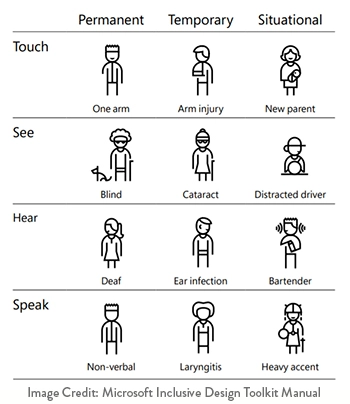
User experience (UX) is what keeps us engaged and coming back for more. With a ranging spectrum of abilities and unique considerations, a great place to start is determining what is important to the users on a universal level. Microsoft’s Inclusive Design Toolkit Manual has a great example where designing closed caption text for someone with a permanent disability like loss of hearing can also benefit others in a situational constraint (e.g. someone learning to read or speak another language). Similarly, ADA 508 compliance designs with high-contract screen settings benefit those with visual impairments, they also benefit a seeing person when they are viewing their device in bright sunlight.
There is no quicker way to lose a user than totally missing the mark designing an experience, or telling a story. To effectively tell the story or share the experience you are designing, it needs to be accessible to all users. We do this by creating User Personas during the UX Research and Strategy phase of our projects. We conduct thorough user research to understand who the end users are, their associated goals/needs, and potential barriers we need to consider to ensure the design meets their needs. We do all of this before we start designing to ensure that we are thinking of the users first.
Design for Everyone
Microsoft knows what they are doing. Our favorite quote they use is, “solve for one, extend to many”. Everyone deserves the right to a comparable user experience, here are some tricks you can consider to make your web designs and products inclusive:
- Language translation options on websites
- Alt text and audio transcripts
- 508 compliant color and contrast
- Screen-reader friendly
- Show password options on login fields
- Give users the control to stop animations, zoom in, and change text color and font size
- Provide multiple ways to view data or complete an action (e.g. data tables to represent the data within a visual infographic – allowing screen readers to read the data aloud)
- Use screen readable tool tips to provide more context or direction for the user
- Keep consistent content hierarchy – prioritize content and associated tasks above all supplemental content
- Use consistent design patterns (e.g. list views, forms, etc.)
Most importantly, consider the value that the design is bringing to the user. If it isn’t valuable, don’t add it. There are additional value-add design principles that can greatly improve the user’s experience, especially on mobile devices:
- Geo location
- Camera
- Vibration
- APIs
These are only a few of many different Inclusive Design practices you can start incorporating into your designs. We challenge you to take a closer look at your website and talk to your users about their experience to ensure that the design supports their abilities and goals.
Great Inclusive Design Examples
Some of the largest players in the tech world are designing inclusively. Here are some very thoughtful tools and features supporting inclusivity in tech:
- Google Docs – Live Edits feature for visually impaired users
- Comcast – Eye-tracking software supporting people with physical impairments
- Lyft & Aptiv – Braille guides for low vision or blind riders
Resources
Helpful Web Tips & Tricks
Start Your Project


