October 28, 2026
.NET can mean very different things depending on what you’re working with. You might be considering it for a new custom application, or you might already have a .NET system that has been running your business for years.
Either way, understanding the technology is only part of the decision. You also need to know how .NET fits your requirements, what technologies may be involved, and what your options are as the application changes over time.
This guide covers the .NET fundamentals that matter from a business perspective, from planning a new application to maintaining, modernizing, migrating, or rebuilding an existing one.
Key Takeaways
- .NET is Microsoft’s development platform for building web, desktop, cloud, and other types of applications. For businesses, it is commonly used for custom applications, internal systems, APIs, integrations, and established software that continues to evolve.
- .NET, .NET Framework, ASP.NET, and ASP.NET Core are related, but they aren’t interchangeable. Knowing what an application actually uses is important when planning development, support, upgrades, or modernization.
- Choosing .NET should start with the application, not the technology. Requirements, workflows, integrations, existing infrastructure, security needs, and long-term support all play a role in whether .NET makes sense for a project.
- An older .NET application doesn’t automatically need to be replaced. Depending on what is working and what is creating limitations, maintaining, modernizing, migrating, or rebuilding can all be reasonable paths.
- Existing applications need to be understood before they can be changed responsibly. Architecture, dependencies, integrations, data, testing, and years of accumulated business logic can all affect the scope and risk of future work.
What is .NET Development?
.NET development is the process of building, maintaining, and improving software using Microsoft’s .NET platform. Businesses use .NET for custom web applications, internal systems, APIs, integrations, and other software designed around their specific requirements.
Modern .NET is open source and cross-platform. C# is its most commonly associated programming language, while ASP.NET Core is the modern framework used to build web applications and APIs.
But the technology is only part of the picture.
A .NET application might be brand new, or it might contain years of business logic and connections to other systems. So .NET development can involve much more than building something from scratch. It can also mean adding functionality, supporting integrations, updating dependencies, improving an existing application, or moving it onto a more modern technical foundation.

That’s why we tend to think about .NET in terms of the application’s full lifecycle, not just the technology it was built with.
.NET vs. .NET Framework vs. ASP.NET Core: What’s the Difference?
If you’re researching .NET development or taking over an existing application, you’ll probably encounter several similar names: .NET, .NET Framework, ASP.NET, ASP.NET Core, and possibly .NET Core.
They’re related, but they all mean different things.
- .NET is Microsoft’s current, open-source, cross-platform development platform. It supports applications running on Windows, Linux, and macOS.
- .NET Framework is the earlier, Windows-focused implementation of .NET. It’s still part of the picture for many existing applications, and Microsoft continues to support it as a Windows component. For new development, however, Microsoft recommends modern .NET rather than .NET Framework.
- ASP.NET is the web application technology associated with .NET Framework, while ASP.NET Core is the modern web framework used with .NET to build web applications and APIs.
- .NET Core is what modern .NET used to be called. Microsoft dropped “Core” from the name starting with .NET 5. So, if you come across .NET Core in older applications or documentation, you’re generally looking at an earlier version of modern .NET, not a completely different platform.
The distinctions become most useful when you’re deciding what to build or what to do with an application you already have.
If you’re planning something new, modern .NET and ASP.NET Core are generally the technologies you’ll hear discussed. If you already have an application, identifying which .NET technologies it uses helps establish what options you have and how significant future changes might be.
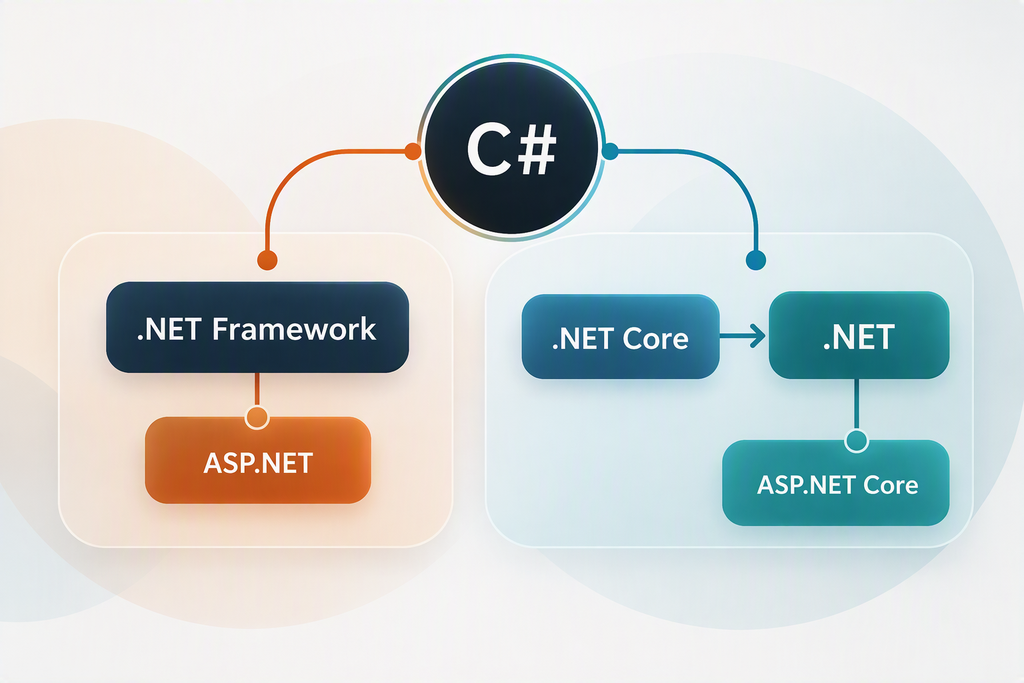
An application running on .NET Framework doesn’t automatically need to be migrated just because newer technology exists. .NET Framework is still supported as part of Windows, so the better question is whether staying on it creates meaningful limitations for the application or where the business needs it to go next.
Moving from .NET Framework to modern .NET can require changes to project structure, dependencies, APIs, or other technologies the application relies on. Moving an older ASP.NET application to ASP.NET Core can be more involved because the application model itself changes.
That’s why we look at the application and the business case for change before treating a newer framework as the answer.
When Does .NET Make Sense for Custom Software?
.NET is a strong fit for many custom business applications, especially when the software needs to do more than solve a simple, isolated problem.
Maybe the application needs to reflect years of business rules. Maybe it needs to connect several existing systems. Maybe it supports a workflow that doesn’t fit neatly into an off-the-shelf product. Or maybe you know the application will need to keep changing as the business does.
Those are all situations where .NET can provide a strong foundation for custom software, including:
- Web applications and portals
- Internal business and operational systems
- Complex workflows
- APIs and integrations
- Data-heavy applications
- Long-lived software that will continue evolving
Of course, .NET isn’t automatically the best choice for every project. But for organizations with specific requirements and software they expect to rely on for years, .NET gives development teams plenty of room to build around the business rather than forcing the business to work around the software.
What Goes Into a Custom .NET Application?
A .NET application is rarely just “.NET.” It’s usually a collection of technologies, data, integrations, and business rules working together to support a larger process.
For example, a custom web application might use C# for application code and ASP.NET Core for the web application and APIs. It might store data in SQL Server, connect with internal or third-party systems through APIs, and run in Microsoft Azure or another hosting environment. Over time, it may also accumulate libraries, packages, authentication services, reporting tools, and other dependencies.
For a business decision-maker, the important thing is how those pieces affect the application as a whole.
They can influence:
- How easily the application can change: A well-structured application may make it easier to update one area without affecting several others.
- How dependent it is on other systems: Integrations with CRMs, ERPs, payment platforms, vendor systems, or internal applications can affect the scope of even seemingly isolated changes.
- How easily the application can be upgraded or modernized: Framework versions, libraries, APIs, and other dependencies can determine what can move forward easily and what requires additional work.
- How much business knowledge is built into the system: Years of workflows, rules, permissions, calculations, and exceptions may represent important business logic worth understanding before anything is replaced.
- What ongoing support looks like: Hosting, integrations, dependencies, data, and the application itself all continue to evolve after launch.
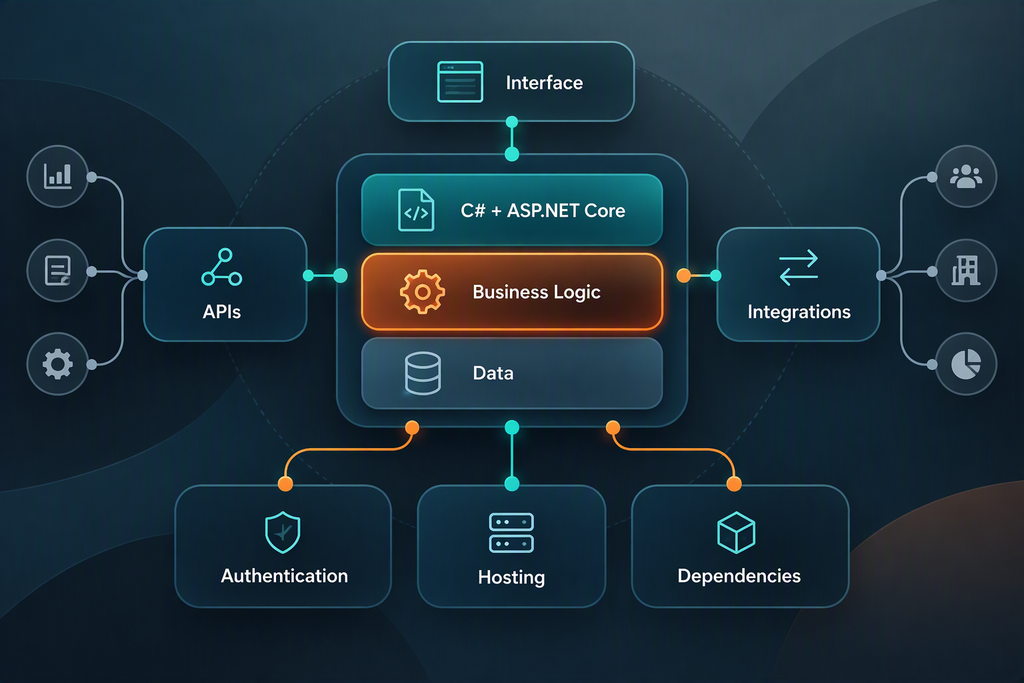
That’s why two applications built with the same .NET technologies can be very different projects to maintain, enhance, or modernize. One might be relatively self-contained, while another has years of connections and business logic that need to be accounted for.
What Should You Plan Before Building a Custom .NET Application?
.NET provides a technical foundation, but the application itself should determine the direction of the project.
Consider the people and processes the software needs to support. Who will use it? What are they trying to accomplish? Where are current workflows creating friction? The answers to those questions help determine what the application should do, rather than simply recreating the current process.
From there, the technical requirements start to take shape. Business rules and permissions need to be accounted for. Data may need to move between the application and other systems. An internal system might need to connect with a CRM or ERP, while a customer-facing application could depend on payment services, authentication, reporting tools, or third-party APIs. Security and compliance requirements may also influence the architecture.
It’s also important to think beyond launch. A custom application tends to evolve alongside the business, so decisions about architecture, integrations, dependencies, and maintainability can affect that process later on.
This is part of why questions like “How long does a .NET application take to build?” or “How much does .NET development cost?” can be hard to answer without proper context. The technology itself is only one variable. Cost and timelines are also driven by factors such as security and compliance requirements, scope, integration complexity, and business goals.
Good .NET development starts with understanding those needs well enough to make intentional technical decisions around them.
What Should You Look for in a .NET Development Partner?
Choosing a .NET development partner involves more than finding a team that knows the technology. You also want a partner who understands what the software needs to accomplish and how it fits into your business.
That starts with asking the right questions. A good development partner should take time to gain an in-depth understanding of your workflows, business requirements, existing systems, and long-term goals before recommending a technical approach. They should also be able to explain their recommendations in terms of what they mean for your project, not just how the technology works.
Beyond experience with the type of work you need, whether it’s building from scratch or migrating an older .NET Framework application to modern .NET, it’s also worth considering what happens after the initial project. Custom applications rarely stay exactly as they were at launch, so ongoing support, documentation, maintainability, and the ability to accommodate future changes should all be part of the conversation.
Ultimately, the right partner should help you make informed decisions about your application, including when it makes sense to build something new, improve what you already have, or leave working functionality in place.
Already Have a .NET Application? Uncover What You Already Have
An established application may already contain years of useful functionality and business knowledge. It may reflect how information moves through the organization, how different users work, and how other systems exchange data. Even an application that needs significant technical attention may contain a lot worth preserving.
The challenge is getting a clear picture of what’s actually there.
The .NET or .NET Framework version is one part of that picture, but so are the application’s architecture, dependencies, integrations, database, hosting environment, testing, and documentation. Just as important is understanding where its business logic lives and which parts users rely on every day.
This is why two similarly aged .NET applications can have very different needs. One may have a clear architecture, current dependencies, and relatively few external connections. Another may depend on older libraries, several integrations, tightly connected components, and years of accumulated business rules.
What Makes an Existing .NET Application Difficult To Change?
Applications rarely become difficult to maintain because of one major technical problem. More often, complexity builds gradually.
New functionality gets added. Integrations change. Dependencies age. A short-term workaround ends up becoming a permanent part of the process. Different developers solve different problems over the course of many years, and documentation may not keep pace.
Eventually, a change that sounds fairly contained starts to affect several other parts of the system.
This is known as technical debt: aspects of an application that make future development harder, slower, or riskier than it needs to be. This can show up as outdated dependencies, duplicated functionality, or architecture that no longer fits how the application has grown, among other things.
That’s not to say technical debt and old code are one and the same. An older application can still be stable and maintainable, while a much newer application may have accumulated technical debt over a short period of time.

Dependencies can be especially important in .NET applications. A .NET Framework application, for example, may rely on libraries, project structures, APIs, or technologies that don’t translate directly to modern .NET. Moving from .NET Framework to modern .NET can involve changes to the project format, application model, APIs, and technologies the application depends on.
The business impact is usually more important than the technical label. If the way the application is structured makes routine changes increasingly difficult, slows development, limits integrations, creates support or security concerns, or prevents the organization from pursuing something it needs, then it should be addressed.
This doesn’t necessarily mean replacing the application. It means identifying where the friction is coming from and determining what it would take to address it, and whether the investment makes business sense.
Should You Maintain, Modernize, Migrate, or Rebuild Your .NET Application?
Once you understand your application and where the value and limitations lie, your options become much clearer.
Maintain: When The Application Is Still Performing
If your application is meeting business needs, it may just need good ongoing support.
Maintenance can include fixing issues, keeping dependencies current, maintaining integrations, monitoring performance, and continuing to add or adjust functionality as requirements change.
This can be the right decision regardless of the application’s age. Technical age alone doesn’t mean software needs to be replaced.
Modernize: When Parts of the Application Are Holding It Back
Modernization focuses on improving an existing application without assuming it needs to be replaced entirely.
That could mean refactoring areas that have become difficult to maintain, updating dependencies, improving the user experience, or addressing other performance problems.
A modernization project might focus on a single integration or application component, or it might involve broader changes to architecture and infrastructure. The right scope depends on which limitations are affecting the business and how closely those parts of the application are connected.
Migrate or Upgrade: When the Underlying Technology Needs To Move
Sometimes the issue is more specifically tied to the application’s technical foundation.
An application might need to move from .NET Framework to modern .NET, from ASP.NET to ASP.NET Core, or from one modern .NET version to another. Hosting and infrastructure changes can become part of the project as well.
Support status can be one reason to upgrade, but it isn’t the only one. Security or compliance requirements, performance and scalability limitations, dependencies reaching end of support, or other technical constraints can also create a reason to move forward.
Rebuild: When the Existing Foundation Is No Longer Useful
There are situations where preserving the existing application begins to create more constraints than value.
The business may have changed substantially since the application was built. The architecture may make improvements difficult across the system, or the application may require extensive changes just to support the current needs of the organization.
At that point, it can make sense to rebuild. This doesn’t mean ignoring what came before, though. Existing workflows, business rules, data integrations, and user knowledge can provide valuable requirements for whatever replaces it.
The Decision Comes Back to Value
Rather than asking whether an application is “too old,” we tend to look at a more practical set of questions.
What still works? What is getting in the way? What does the business need next? How well-equipped is the existing application to get it there?
This creates a much stronger basis for deciding whether the right move is maintenance, targeted modernization, or migration.
What Should Business Leaders Know About .NET Migration?
Moving from .NET Framework to modern .NET can put an established .NET application on a current .NET foundation, but the amount of work involved varies widely from project to project.
For some applications, most of the existing code and functionality can carry forward. Others depend on older APIs, libraries, project structures, or Windows-specific technologies that require more substantial changes. The application model itself may also change, especially when moving an older ASP.NET application to ASP.NET Core. Depending on the application, migration may involve changes to project formats, APIs, dependencies, or even how the application itself is structured.
That’s why migration planning should start with understanding the existing application and the business goals behind the move.
Once there is an understanding of what the application depends on, which components will remain compatible, what functionality needs to change, and where migration creates an opportunity to solve existing problems, we can explore how the migration will happen.
Some applications can be upgraded all at once, while larger or more complex projects may benefit from moving functionality in stages. Current .NET tooling and guidance support multiple upgrade paths depending on the type of project and starting point.
The important distinction is that migration is a means to an outcome, not the outcome itself. The goal is to leave the application in a better position to support what the organization needs next.
What Does a .NET Application Need After Launch?
Custom software should be built with room to grow as the organization around it grows.
Users may need new functionality. Business rules evolve. New security requirements emerge. Something that performed well for the first several years may eventually need to handle more users, more data, or a different workflow.
That makes support and maintenance part of the application lifecycle rather than something that begins only when software breaks.
For a .NET application, ongoing work might involve troubleshooting production issues one month and adding a new integration the next. Over time, it can also mean keeping an eye on framework versions and dependencies, addressing performance or security concerns, reducing technical debt, and planning larger improvements before they become urgent needs.
Modern .NET itself also has an ongoing release lifecycle. Major versions are released annually, with defined support periods for Long Term Support (LTS) and Standard Term Support (STS) releases, so version planning becomes part of maintaining applications built on modern .NET.
Continuity makes a difference, too. When a development team understands the application’s architecture, business logic, integrations, and history, they don’t have to spend time rediscovering the system every time updates or changes need to be made.
Good application support isn’t just about keeping software running. It’s about keeping the application useful as the business continues to grow and change.
Building What’s Next With .NET
Maybe you’re building something new. Maybe you’ve inherited an application someone else built. Or maybe you have a .NET system that still does important work but needs attention in a few places.
AVIBE works across that entire lifecycle. We build custom .NET applications, take over and support existing systems, modernize applications that have become harder to change, and help organizations plan migrations and upgrades when the underlying technology needs to move forward.
We don’t start with the assumption that everything needs to be rebuilt or moved to the newest technology. We start with the application you have, the business it supports, and what you need from it next.
Whether you’re planning a new .NET application or evaluating what to do with an existing one, AVIBE can help you understand your options and determine a practical path forward. Let’s talk about what your business needs next.
Frequently Asked Questions
Is .NET the same as C#?
No. .NET is a development platform, while C# is a programming language commonly used to build .NET applications. C# is closely associated with .NET, but the terms don’t mean the same thing.
Is .NET only for Windows?
Modern .NET is cross-platform and can run on Windows, Linux, and macOS. However, an existing application’s portability still depends on what it was built with and the technologies it relies on. A .NET Framework application or one using Windows-specific components may have different constraints from an application designed for modern .NET.
Does an older .NET application need to be replaced?
Not necessarily. Age alone doesn’t determine whether an application should be replaced. If the system still supports the business effectively, ongoing maintenance or targeted modernization may make more sense. Migration or rebuilding becomes more relevant when the existing application creates meaningful limitations, risk, or difficulty supporting future requirements.
Can you modernize a .NET application without rebuilding it?
Yes. Modernization can focus on particular areas of an application while preserving functionality that still provides value. Depending on the application, that could involve its code and architecture, user experience, integrations, dependencies, data, infrastructure, or other areas that are creating limitations.
Is .NET Framework still supported?
Yes. .NET Framework continues to be supported as a Windows component, with its support following the lifecycle of the underlying Windows operating system. Modern .NET follows a different release and support model, with individual versions receiving defined support periods.
Helpful Web Tips & Tricks
Start Your Project