November 25, 2020
Efficiency = happy developers
What is an IDE?

Besides being a developer’s best friend, an integrated development environment (IDE) is an application that helps streamline software development. They normally come equip with a source code editor, automation tools for building software, and a debugger. Think of it as a one-stop-shop for developers. They come with the necessary tools programmers need for development, eliminating the need to constantly switch from tool-to-tool. Efficiency = happy developers!
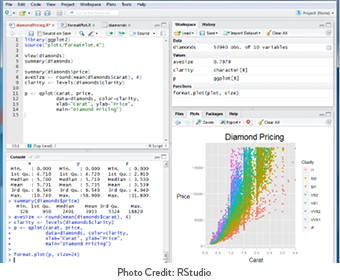
Programmers aren’t the only job role that benefits from IDEs, they are also used by Data Scientists, Data Engineers, Data Analysts, Statisticians, and Business Analysts. Some IDE’s like RStudio help data professionals with statistical analysis.
Benefits of using an IDE
There are so many benefits of IDEs, they greatly reduce setup time for application development, which in turn, aids in developer productivity and efficiency. Some IDEs have built-in caching on startup so the rest of the developer’s tasks are streamlined and speedy.
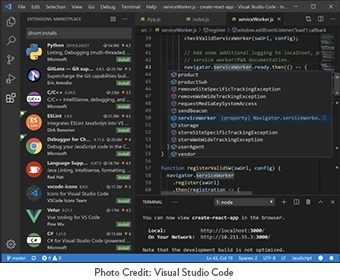
One of our team’s favorite IDEs is Visual Studio Code. It works great for teams who are working remotely as it is integrated with Git. It comes with several useful extensions that improve developer workflow. Some extensions and features that we love include:
- Programming language syntax highlighting
- JSON
- XML ToolsAuto-Close Tag
- Trailing Whitespaces
- TortoiseSVN
- SVN – Subversion built into source control
- SQL Server – connect built into VS Code
- Keymap and Settings Importer – text editor like Sublime text
- CommandBox
- REST Client
- View and edit CSVs
- And much more!
Visual Studio Code is a helpful tool for new developers who are learning how to code.
Choosing the Right IDE for You
There are so many IDEs available today, it can be hard to choose what is best for you. If you are a data professional, RStudio Connect may be a good fit for you. It allows you to run data analysis scripts, reports, and includes graphing capabilities. RStudio is available for purchase, price varies depending on the number of users.
If you are a programmer, you are likely looking for an IDE that encapsulates all of the tools that you typically work with when developing web applications. Visual Studio Code may be a great fit for you, we encourage you to download it and check-it out for yourself – it’s free!
Popular Free IDEs to Try
- Visual Studio Code – https://code.visualstudio.com/
- Microsoft Visual Studio – https://visualstudio.microsoft.com/
- Eclipse – https://www.eclipse.org/ide/
- Sublime Text – https://www.sublimetext.com/
Helpful Web Tips & Tricks
Start Your Project