May 28, 2026
If your organization is running a ColdFusion application, you already know it works. It has probably been working for a long time, quietly powering operations, storing data, connecting systems, and doing exactly what it was built to do. There is genuine value to that kind of reliability, and it’s why so many organizations have been comfortable leaving well enough alone.
Something has shifted, though. Support timelines are tightening. Security advisories are piling up. The developer who built the system is either gone or getting harder to replace. And perhaps somewhere in your organization, someone is starting to ask: what is the plan here?
This guide is designed to help you answer that question clearly and honestly. The answer will vary from case to case: our goal is to provide you with the information you need to understand where ColdFusion development stands today, what your options really are, and how to make a decision you can stand behind. Whether you’re trying to optimize and stabilize what you have, planning a modernization, or just beginning to explore your options, this is a good place to start.
Key Takeaways
- Several versions of ColdFusion have already reached end-of-life, and Adobe’s extended support for CF 2021 does not include security patches or hotfixes. Organizations still on older versions are carrying active, unpatched risk.
- With ColdFusion 2025, Adobe eliminated perpetual licensing entirely, making subscription-only pricing the path forward for organizations that want to stay on a supported version.
- Maintaining, modernizing, and migrating are all legitimate options, and the right choice depends on your current version, documentation quality, internal expertise, and the true total cost of your current situation.
- Any ColdFusion modernization or migration project should begin with thorough discovery. Surfacing undocumented business logic before development starts is what separates successful implementations from failed ones.
What is ColdFusion, and Why Are So Many Organizations Still Running It?
ColdFusion is a commercial application server and development platform, first released in 1995 and eventually acquired by Adobe. It uses a proprietary language called ColdFusion Markup Language (CFML), which was designed to make web application development faster and more accessible. And it definitely delivered on that promise.
At its peak, ColdFusion was widely adopted across government agencies, universities, healthcare organizations, and enterprise businesses. A huge selling point was that it allowed developers to build complex, database-driven applications quickly and without an army of engineers.
That speed and accessibility had a meaningful side effect: a lot of mission-critical systems were built on ColdFusion, and many of them were built to last. The systems running quietly in agencies and operations centers today have held up for a reason. They’ve often outlasted the teams that built them, the vendors that sold them, and several rounds of conversations around replacement.
These systems have persisted because they were built for real operational complexity. The challenge isn’t that they are still around, but that the environment around them has kept moving.
The State of ColdFusion Today
Adobe continues to develop and support the platform. ColdFusion 2025, the most recent major release, brings genuine improvements, including enhanced cloud and container support, updated security tooling, and modernized DevOps integration. The language has adapted over time. Organizations running current, maintained versions of ColdFusion are working with a platform that still has real capability and active vendor support.
That said, there are real changes to the landscape that any organization running ColdFusion should understand.
End-of-Life Timelines Are Approaching
Adobe maintains a fixed lifecycle policy for ColdFusion, and several versions have now reached or are approaching their end of support. Here’s where things currently stand.
| ColdFusion Version | Core Support Ended/Ends | Extended Support Ended/Ends | Risk Level |
|---|---|---|---|
| CF 11 and earlier | April 2019 | April 2021 | Fully unsupported: no patches or hotfixes |
| CF 2016 | February 2021 | February 2022 | Fully unsupported: no patches or hotfixes |
| CF 2018 | July 2023 | July 2024 | Fully unsupported: no patches or hotfixes |
| CF 2021 | November 2025 | November 2026 | Extended support only: no security patches or hotfixes |
| CF 2023 | May 2028 | May 2029 | Actively supported: security patches available |
| CF 2025 | February 2030 | TBD | Current release |
One important detail that often gets missed: Adobe’s extended support for CF 2021 is not a safety net. According to Adobe, extended support covers migration assistance only. It does not include security patches or hotfixes. Organizations still running CF 2021 who believe they have continued security coverage are operating on a false assumption.
The Licensing Model Has Changed
With the release of ColdFusion 2025, Adobe eliminated perpetual licensing entirely. The platform is now subscription only, with the Standard tier costing $960 per server per year and Enterprise costing $2,930 per server per year.
For organizations that previously purchased a perpetual license and planned to stay on it indefinitely, that path is no longer viable. Staying on an older version to avoid the subscription model is increasingly a security risk, not a cost-effective strategy.
Security Vulnerabilities Are Ongoing
ColdFusion has been a consistent target for attackers. In 2025 alone, dozens of security vulnerabilities were published for the platform. The U.S. Cybersecurity and Infrastructure Security Agency (CISA) has added multiple ColdFusion vulnerabilities to its Known Exploited Vulnerabilities catalog and has confirmed that ColdFusion exploits were used to breach government servers. This is not theoretical risk: it’s documented and ongoing.
The good news is that the risk doesn’t come from ColdFusion itself. Instead, it comes from neglect. Organizations running current, patched versions with proper security configurations are in a fundamentally different position than those running outdated, unpatched instances exposed to the internet.
ColdFusion: Modernization vs. Migration
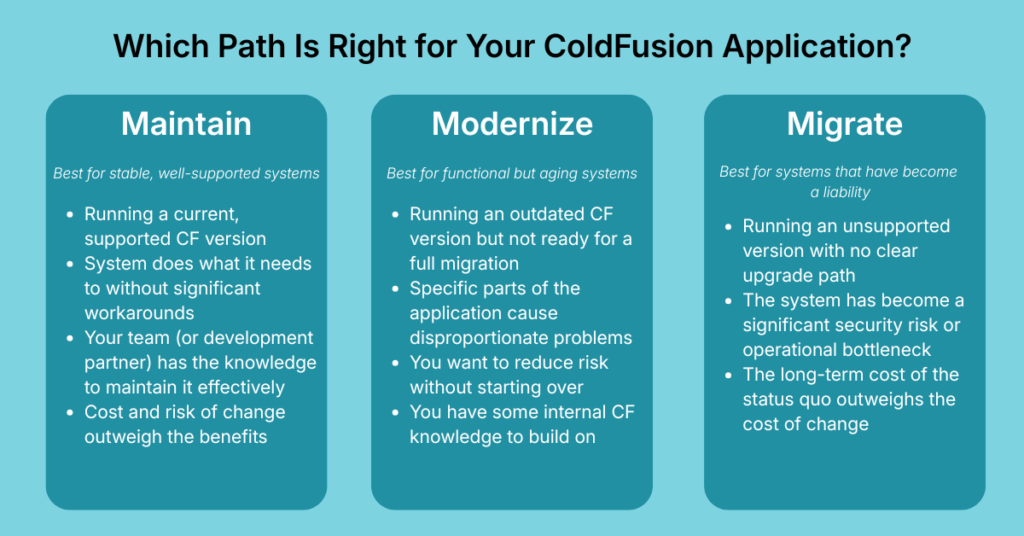
If you’re utilizing a ColdFusion system, at some point you may find yourself asking if you should modernize, migrate, or maintain. There is no universal answer. The right path depends on your specific system, your organization’s risk tolerance, your operational constraints, and what your goals are. Here’s an honest look at the three primary options.
Option 1: Maintain and Optimize
Best for: Organizations running a current, supported version of ColdFusion whose system is stable, adequately documented, and not creating significant operational friction.
Maintaining your ColdFusion application is a legitimate strategy, but only if it’s an active, deliberate choice rather than a default. Active maintenance means staying current on security patches, planning for version upgrades as older releases hit end-of-life, ensuring your system is documented, and having a plan for developer continuity.
If your system is running CF 2025 (or CF 2023 with a clear upgrade path), your team has working knowledge of the codebase, and you’re not hitting walls around performance, integrations, or scalability, maintaining or optimizing may be the exact right call. Not every system needs to be replaced.
In practice, this means treating maintenance as a program rather than a task. That includes a documented inventory of what your system does and how, a patching schedule that accounts for both ColdFusion and the underlying Java environment, and a version roadmap that keeps you ahead of end-of-life dates rather than reacting to them.
Organizations that maintain well tend to have fewer emergencies, not because nothing ever goes wrong, but because they know their systems well enough to catch problems before they become crises.
Signs that maintaining your ColdFusion system is the right path:
- You’re running a supported version and staying current on patches
- The system does what it needs to do without significant manual workarounds
- Your team has the knowledge to maintain it effectively
- The cost and risk of change outweigh the benefits
Option 2: Modernize in Place
Best for: Organizations with systems that are functional but aging. Here, a full migration isn’t warranted, but the status quo has real gaps.
Modernization doesn’t necessarily mean starting over. It often means selectively improving what you have: upgrading to a current ColdFusion version, refactoring the most problematic parts of the codebase, improving integrations with modern tools, adding documentation, and shoring up security. This is typically a phased approach, prioritizing the highest-risk or highest-friction areas first, then working outward.
The advantage here is continuity. Your system keeps running while improvements happen incrementally. The risk is scope creep, since modernization projects can grow if they aren’t tightly scoped from the start.
In practice, this usually begins with identifying which parts of the application are causing the most friction in your day-to-day workflow. Those are the areas that should be prioritized. The rest of the system stays in place and keeps running while targeted improvements are made. Clients typically start seeing the benefit of specific changes well before the broader modernization effort is complete.
Signs that modernizing your ColdFusion system is the right path:
- Your system works but is running an outdated CF version
- Specific parts of the application cause disproportionate problems
- You want to reduce risk without a full migration
- You have some internal CF knowledge to build on
Option 3: Migrate to a Modern Framework
Best for: Organizations where the ColdFusion application is a significant source of operational risk, technical debt, or constraint, and where the long-term cost of maintaining it outweighs the cost and disruption of migration.
A full migration means moving your application’s functionality to a modern framework like Laravel, Node.js, or another platform, and is the most involved path. It requires thorough discovery of how your system actually works (including undocumented business logic), along with careful planning and phased execution. It also requires sustained commitment from both the development partner and the client organization.
If migration is rushed or poorly managed, it can lead to failed implementation. With the right approach, though, ColdFusion migration eliminates the long-term risk of running an aging platform and opens the door to modern integrations and better performance.
In practice, the discovery phase of a migration is where the real work begins. Applications that have been running for years frequently contain business rules that exist nowhere else. Surfacing all of that before development starts is what separates a migration that lands cleanly from one that produces a system that doesn’t fit your team’s needs. The time spent in discovery is essential and creates the foundation that everything else is built on.
Signs that migrating your ColdFusion system is the right path:
- You’re running an unsupported CF version with no clear upgrade path
- The system is a significant source of security risks or operational bottlenecks
- You’re struggling to find developers who can maintain it
- The long-term cost of the status quo is greater than the cost of change
How To Make the Decision
The honest answer is that most organizations exist somewhere on a spectrum, and the right path isn’t always obvious from the outside. Here are a few questions worth exploring:
- What version are you running, and what is its support status? If you’re on CF 2021 or older, the decision only becomes more urgent.
- How well-documented is the system? Poorly documented systems are expensive and risky to migrate, but also more dangerous to leave alone.
- What is the system truly costing you today? Hidden costs, such as manual workarounds, staff time on patches, and the risk premium of running unsupported software, often exceed what’s visible in a maintenance budget.
- What does your team’s CF knowledge look like? If your institutional knowledge is concentrated in one or two people, that’s a risk regardless of which path you choose.
- What’s your organization’s tolerance for disruption? Migrations and modernizations require real involvement from your team. Understanding that cost upfront leads to better outcomes.
If you aren’t sure where you fall, the right first step is usually a structured assessment. This gives you an honest evaluation of where your system stands and what the best path forward is.
What ColdFusion Modernization Actually Looks Like
Knowing your options is an important starting point. Understanding how the process works from your side of the table is the next step to moving forward with confidence.
A well-run engagement starts before any code is written. Discovery, the phase where a development team works to genuinely understand your application and the organization around it, is where the foundation gets laid. That means conversations with the people closest to the system and a careful review of the codebase itself. This isn’t done so developers can immediately start changing things, but to allow them to develop an honest picture of what is there.
Discovery matters more than it might seem. Applications that have been running for years tend to accumulate unique quirks, from business rules built to solve a specific problem (and never written down) to integrations that work in ways nobody fully remembers. A development team that starts building before those things are surfaced will find them eventually. The difference is whether that happens during discovery, when they are cheap to address, or mid-project, when they aren’t.
What happens after launch is also worth asking about before you choose a partner. Introducing a system your team doesn’t fully understand or trust just trades one problem for another. Post-launch involvement is critical and should be included in conversations early in the process.
Common ColdFusion Challenges and How To Address Them
Most organizations running ColdFusion applications aren’t dealing with one problem in isolation. Instead, they’re dealing with several at once, often without a clear picture of which is most urgent. Here are the challenges we see most frequently, and what addressing them actually looks like.
Finding and Retaining ColdFusion Developers
The ColdFusion talent pool is small and shrinking. Experienced CFML developers command strong rates, and when they leave, they typically take undocumented institutional knowledge with them. This creates a compounding problem: the longer a system goes without proper documentation, the more dependent it becomes on whoever currently understands it.
Addressing this looks different depending on where you are. For organizations trying to maintain existing systems, it often means partnering with a firm that already has CF expertise on staff rather than competing for scarce individual talent. For organizations considering migration, it means the talent problem eventually resolves, as modern frameworks have much larger developer pools.
Security Vulnerabilities and Patch Management
Running an unsupported ColdFusion version is an active risk. CISA has documented ColdFusion exploits against real organizations, including federal government agencies. Even on a supported version of ColdFusion, security is not automatic. You still need to monitor Adobe’s security updates and apply the latest ColdFusion patches to keep the server fully protected.
For organizations in compliance-heavy environments, such as government, healthcare, or finance, the security posture of a ColdFusion application is both an IT concern and a regulatory one.
Performance and Scalability Constraints
Older ColdFusion applications were often built for the scale of their time, and the systems around them have since grown. Over time, CF applications might start showing performance strain, including slow load times, database bottlenecks, and difficulty handling concurrent users. This usually means that the architecture needs attention, not just the code.
This is an area where modernization in place can often deliver meaningful improvement without a full migration. Targeted refactoring, caching improvements, and infrastructure updates can significantly extend the useful life of a well-built application.
Integration With Modern Tools and Systems

One of the most common frustrations organizations bring to us is that their ColdFusion application doesn’t connect well (or at all) to the other tools their teams rely on. Modern ColdFusion versions support REST APIs and contemporary integration patterns, but older implementations often don’t, leaving teams to bridge gaps manually.
If your staff is regularly exporting data from one system and importing it into another by hand, that’s not a workflow problem. That is a systems problem, and it’s solvable.
Compliance Requirements Creating Technical Debt
Organizations operating under strict regulatory requirements, including HIPAA, FedRAMP, and data privacy laws, sometimes find that their ColdFusion system’s architecture makes compliance harder than it needs to be. Controls that should be built into the software get handled through manual processes instead, increasing the risk of human error and the burden on staff.
The goal in these situations is to build compliance into the software itself, so that doing things correctly becomes the path of least resistance rather than an extra step.
What To Look for in a ColdFusion Development Partner
If you’ve determined that you need outside expertise, the partner you choose matters just as much as the technical approach. Whether you are maintaining, modernizing, or migrating your ColdFusion application, there are a few things worth evaluating carefully:
Genuine ColdFusion Experience
This may sound obvious, but it’s definitely worth keeping in mind. ColdFusion development is a specialized skill, and not every firm that lists it as a capability has deep, current experience with it.
Ask about specific projects. Ask how many developers on their team work in CFML regularly. Ask what versions of ColdFusion they’ve worked with recently. The right partner will be able to speak in detail about the strengths, limitations, and specific decisions that go into maintaining or migrating a ColdFusion application.
A Discovery-First Process
Any partner who is ready to propose a solution before they understand your system is skipping the most important step. Good ColdFusion work starts with genuine discovery: understanding how the application actually works, what business logic is embedded in it, where the risk is concentrated, and what your organization wants and needs from the system going forward.
This process takes time and requires real involvement from both teams. A strong ColdFusion development partner treats discovery as an essential part of the process to minimize surprises as the project progresses.
Experience With Your Type of Organization
From government agencies and nonprofits to compliance-heavy businesses and healthcare systems, ColdFusion is disproportionately present in organizations with complex operational environments. Working in those spheres requires more than technical skills. It requires familiarity with regulatory constraints, procurement processes, change management challenges, and the reality that disruption to critical systems has real consequences.
Ask whether they’ve worked with organizations like yours. The best partner for you will answer with specifics.
Clear Communication and Realistic Expectations
Custom software projects evolve. Requirements change, edge cases emerge, and things that seemed straightforward in discovery turn out to be more complex. A good partner doesn’t pretend otherwise. Instead, they build a process that anticipates change, communicates proactively when it happens, and keeps you informed throughout the project.
Be cautious of any firm that guarantees fixed outcomes on complex projects without qualification. Confidence is appropriate, but absolutes are a red flag.
Involvement Beyond Launch
The work doesn’t end when the software is deployed. Adoption has its own challenges, especially on teams where training resources are limited and staff turnover is high. A partner who disappears after launch leaves you to figure out the hard part on your own.
Look for a firm that plans for post-launch support from the beginning, not as an afterthought.
Ready to Talk It Through?
We take a consultative approach for a reason: every organization works differently, and the best solution is the one that actually fits how your team operates. If you’re running a ColdFusion application and trying to figure out what comes next, start with a conversation.
Frequently Asked Questions
How long does a ColdFusion migration take?
It depends heavily on the size and complexity of the application, the state of its documentation, and how well the business logic is understood before a ColdFusion development project begins. A smaller, well-documented application might be migrated in a matter of months. A large, underdocumented system with years of embedded business logic could take significantly longer. A critical variable is how much discovery is required before development can begin, which is why skipping that step to save time almost always costs more in the end.
How do I know if my system is a good candidate for modernization versus full migration?
A few factors point toward modernization in place. Maybe the system is running a supported CF version, or the system is relatively well-documented, and the problems you’re experiencing are specific rather than systemic.
Factors that point toward migration include running an unsupported version with no clear upgrade path, significant undocumented business logic, persistent performance or integration problems, and difficulty finding developers who can work on it. Most organizations benefit from a structured assessment before committing to either path.
What does a ColdFusion project typically cost?
The cost of a ColdFusion modernization or migration project is determined by scope, and scope is determined by what is in the system. What we can say is that the cost of a well-scoped project is almost always lower than the accumulated cost of inaction. The staff time spent on manual workarounds, the risk premium of running unsupported software, the emergency costs when something breaks, and the subscription maintenance expenses compound over time. The right starting point is an honest assessment of what the current situation is actually costing you, or what it could cost you in the long run.
Can ColdFusion integrate with modern tools and APIs?
Current versions of ColdFusion support REST APIs and can integrate with modern platforms and services. The challenge is more often in older implementations that predate those capabilities. Systems built before modern integration patterns were common may require refactoring to connect effectively with contemporary tools.
What happens to my data during a migration?
Data migration is one of the most carefully managed parts of any well-run project. A responsible partner will map your data structures early in discovery, plan the migration in phases, validate data integrity at each stage, and run parallel systems where necessary before cutover/transition. Your data moves deliberately, with verification at each step—it does not just disappear.
We’ve had a failed software implementation before. How is this different?
Failed implementations usually share a few common causes:
- Insufficient discovery before development began
- Poor communication during the project
- Underestimated scope
- Inadequate attention to adoption after launch
The answer to each of these isn’t a different technology, but a different process and a different kind of partnership. The right partner will acknowledge those risks directly and walk you through how their process specifically addresses them.
Helpful Web Tips & Tricks
Start Your Project